
A skip trace finds contact details for the owner of a property you've saved. It uses 1 credit only when contact info is found, and every result lands on the owner's contact.
Before You Start
Check three things first:
- Your plan is Starter or Pro. On Free, skip tracing is off.
- The property has a street plus a ZIP, or a city and state.
- You have at least 1 credit. Your balance shows under the button and on your Dashboard.
Run a Skip Trace
Open the property. In the Owner card, choose Find owner phone and email (1 credit).
To trace many owners at once, tick properties on the Properties list and choose Skip trace in the bar that appears. Before it starts, you see how many credits it can use. A run covers up to 100 properties.
Not ready to spend a credit? The same card links to free public people search sites, which open in a new tab.
Read the Results
Results appear in the Owner card:
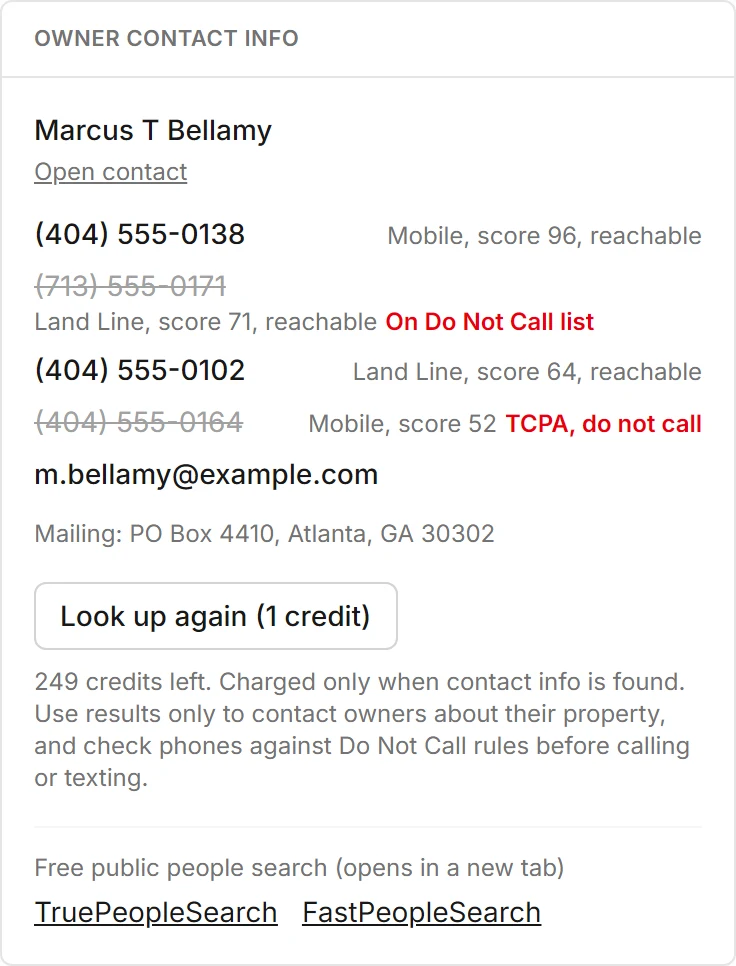
- Phones
- Sorted by score. Reachable numbers are marked.
- Emails
- Every email address found for the owner.
- Mailing address
- Where the owner gets mail.
- Notes
- A note when the owner is reported deceased.
Check the Flags Before You Dial
Propulator marks risky numbers before anyone on your team calls:
- On Do Not Call list: the number is struck through and can't be tapped to call.
- TCPA, do not call: the number is tied to TCPA litigation, and is struck through the same way.
- Litigator owner: a warning not to call or text them, and every phone is struck through.
The flags can be incomplete and don't cover state lists or your own do-not-contact list. Use results only to contact owners about their property. Following calling and texting laws is your responsibility.
Where Results Are Saved
Phones and emails are added to the property's owner contact. If the property has no owner contact yet, a seller contact is created and linked as the owner. Nothing you typed is replaced.
Choose Open contact to see them. The flags show on the contact's phone numbers too, and the property's activity notes how many phones and emails were found.
Look Up Again
After a lookup, the button changes to Look up again (1 credit). It runs a fresh search and asks you first, because it uses 1 credit if contact info is found.
Bulk runs reuse any result from the last 90 days instead, so you don't pay twice for the same owner.
Credits and Refunds
| Match found | 1 credit |
|---|---|
| No match | Credit refunded automatically |
| Lookup service didn't answer | Credit refunded |
| Bulk run, traced in the last 90 days | Skipped, no credit |
| Starter | 750 credits a month |
| Pro | 2,000 credits a month |
Plan credits reset each billing month and don't roll over. Packs of 100 cost $19 on Starter or Pro and last 12 months. Credits that expire soonest are used first.
Buy packs and see every credit used or refunded under Settings, Plan and credits.